
Close your eyes and imagine a sound. Not a song—a sound. The soft click of a playlist loading. The gentle thrum of a green spectrum analyzer dancing to a bassline. And then, a voice: “Winamp, it really whips the llama’s ass.”
For millions of people who grew up downloading MP3 files in the late 1990s and early 2000s, Winamp was not just a media player. It was a ritual. It was the gateway to digital music freedom. And while streaming services like Spotify and Apple Music dominate today, Winamp Classic refuses to fade away.
This guide covers everything you need to know about Winamp Classic—its history, features, plugin ecosystem, how to run it on modern Windows, and why a growing community still swears by this lightweight powerhouse in 2026.
What Is Winamp Classic? A Digital Music Icon
Winamp Classic is a media player for Windows originally developed by Nullsoft, a small company founded by Justin Frankel and Dmitry Boldyrev. The first version hit the internet in 1997, at a time when the MP3 format was just beginning to change how people consumed music.
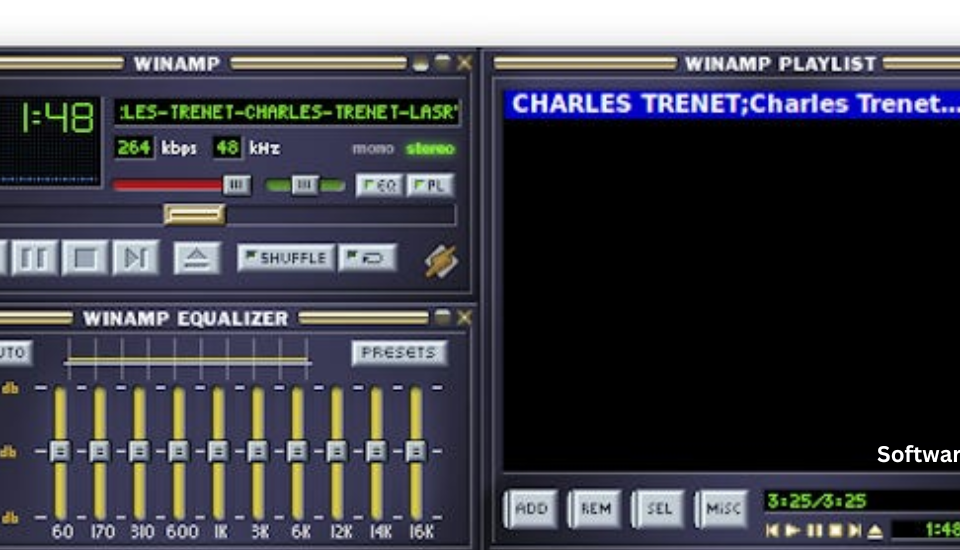
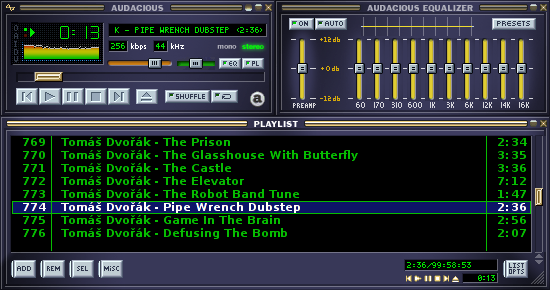
Unlike the bloated media applications that would come later, Winamp Classic focused on one thing: playing audio files quickly and efficiently. The interface was compact—a small rectangular window with playback controls, a playlist editor, and a graphic equalizer. It launched instantly. It barely used any system resources. And it worked with almost every audio format available.
The “Classic” designation distinguishes this version from the later Winamp 5.x releases, which incorporated video playback and a more modern interface. Version 2.91, available on CNET Download, represents the pure, distilled Winamp experience that millions fell in love with.
Key features that defined Winamp Classic:
- Lightning-fast performance – Launched in under a second on period hardware
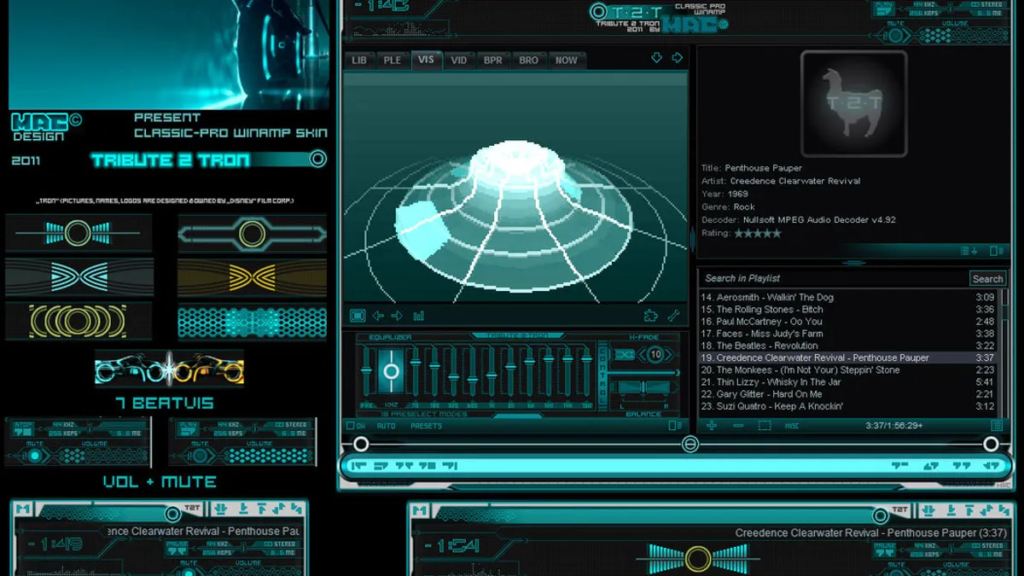
- Skins – Thousands of custom appearances, from sci-fi panels to realistic toasters
- Visualizations – Dancing graphics that reacted to your music in real time
- Plugins – An entire ecosystem of add-ons for formats, effects, and features
- Equalizer – A 10-band graphic equalizer with presets for every genre
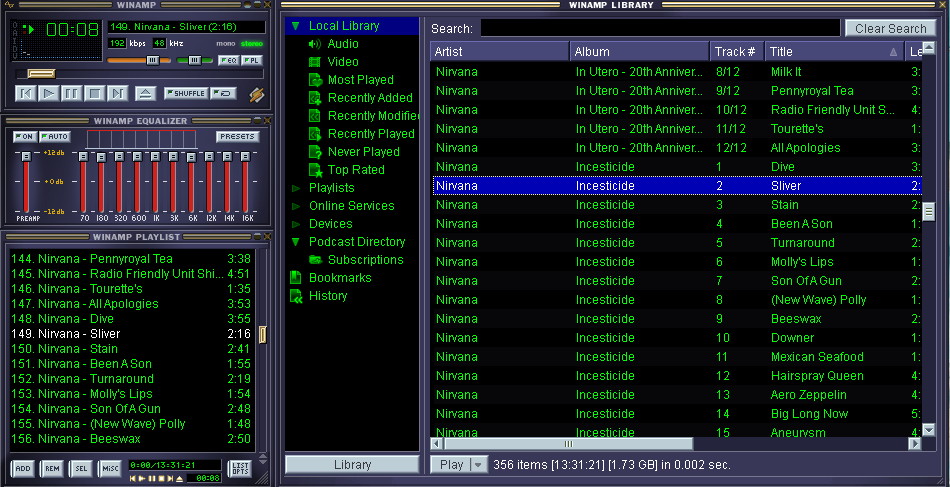
- Playlist management – Simple drag-and-drop organization of massive music libraries
The History of Winamp: From Shareware Sensation to Cult Classic
The MP3 Revolution (1997-1999)
Before Winamp, playing an MP3 file was a technical challenge. Early players were clunky, unreliable, or required command-line knowledge. Winamp changed everything. It was free, it worked beautifully, and it looked cool. By 1998, millions of users had downloaded it.
The player spread through word of mouth, IRC channels, and CD-ROM cover discs. College students filled their newly spacious hard drives with MP3s and organized them using Winamp’s playlist system.
The AOL Era (1999-2013)
In 1999, AOL acquired Nullsoft for a reported $80 million. The acquisition brought resources and distribution but also corporate oversight. The famously irreverent Winamp team—known for hidden jokes and Easter eggs—now worked under a media giant.
Winamp continued to evolve. Version 3 introduced a more modular architecture (though it was less popular with purists). Version 5 (the “5” was a joke—2+3=5) unified the classic interface with newer features.
The Dark Years and Resurrection (2013-Present)
In 2013, AOL announced it was shutting down Winamp. Fans mourned. Social media filled with tributes. Then, unexpectedly, Belgian company Radionomy acquired Winamp in 2014. New versions emerged: Winamp 5.8 in 2018, and occasional updates since.
But the Classic version never died. Enthusiasts archived the installers, preserved the skins, and kept the plugins alive. Version 2.91 remains available on CNET Download, still functioning on modern Windows systems (with a little tweaking).
Deep Dive: Features That Made Winamp Classic Great
1. Lightweight Performance – A Featherweight Champion
Winamp Classic was designed for computers with 166 MHz processors and 32 MB of RAM. On a modern machine, it launches almost before you finish clicking the icon. Memory usage hovers around 10-20 MB—a fraction of what a web browser consumes.
This efficiency matters. You can run Winamp in the background while gaming, editing video, or working with resource-intensive software. It never stutters, never buffers, and never demands your attention.
Who benefits from lightweight performance:
- Gamers who want background music without FPS drops
- Users with older laptops or low-power devices
- Anyone tired of bloated “media centers” that take 30 seconds to launch
2. The Equalizer – Sculpt Your Sound
The 10-band graphic equalizer was a standout feature in Winamp’s era. It allowed users to boost or cut specific frequency ranges: 60Hz (sub-bass), 170Hz (bass), 310Hz, 600Hz, 1kHz, 3kHz, 6kHz, 12kHz, 14kHz, and 16kHz (high treble).
Built-in presets included:
- Classical – Emphasizes mids and highs
- Club – Boosted bass and treble
- Full Bass – Heavy low-end
- Pop – Slight mid boost
- Rock – Balanced with slight bass and treble emphasis
- Soft – Reduced highs and lows
You could also create and save custom presets for specific headphones, speakers, or songs.
3. Skins – Make It Your Own
The skin system was revolutionary. Winamp’s default interface was a gray, brushed-metal rectangle. But you could download a skin file (with a .WSZ extension) and completely transform the player’s appearance.
Skin categories included:
- Realistic – Car stereos, boomboxes, cassette decks
- Sci-fi – Control panels from spaceships
- Anime – Characters from popular series
- Minimalist – Tiny monochrome bars
- Holiday – Christmas, Halloween themes
Thousands of skins were created. Many remain archived online, though modern high-DPI displays may render them smaller than intended.
4. Visualizations – Music You Can See
The visualizations were hypnotic. The default “spectrum analyzer” showed green bars dancing to the frequencies. More advanced visualizations, like the legendary MilkDrop, created complex, colorful, organic patterns that evolved with the music.
MilkDrop, originally created by Ryan Geiss, became a cultural phenomenon. People would launch Winamp just to watch MilkDrop while listening to albums. The plugin is still maintained by fans and works on modern Windows.
5. Plugin Architecture – Unlimited Expansion
Winamp’s plugin system allowed developers to add virtually any feature imaginable. Plugins fell into several categories:
| Plugin Type | Purpose | Examples |
|---|---|---|
| Input | Add audio format support | FLAC, OGG, AAC, WMA |
| Output | Change audio routing | ASIO, WaveOut, DirectSound |
| DSP/Effect | Process audio in real time | Crossfader, tempo changer, reverb |
| Visualization | Create visuals | MilkDrop, AVS (Advanced Visualization Studio) |
| General Purpose | Add interface features | Global hotkeys, lyrics display, album art |
This open ecosystem is why Winamp remained useful for years after its peak. If Winamp could not do something, a plugin probably existed to add it.
6. Playlist Management – Organize the Chaos
For users with thousands of MP3 files—often poorly named, scattered across folders—Winamp’s playlist system was a lifesaver. You could drag and drop files from Windows Explorer, sort them by various criteria, search within large lists, and save playlists as M3U files.
The M3U format became a standard. Other players (including VLC and foobar2000) can read M3U files, so your carefully curated playlists are not locked into Winamp.
Winamp Classic vs. Modern Alternatives in 2026
How does a player from 1997 stack up against today’s options?
| Feature | Winamp Classic | VLC Media Player | foobar2000 | Spotify | MusicBee |
|---|---|---|---|---|---|
| Primary focus | Audio playback | Everything | Audio | Streaming | Audio management |
| Installation size | ~5 MB | ~40 MB | ~15 MB | N/A (app) | ~15 MB |
| RAM usage (idle) | ~10 MB | ~50 MB | ~15 MB | ~150 MB | ~40 MB |
| Audio formats (native) | MP3, WAV, MIDI, MOD | Almost all | MP3, FLAC, WAV, etc. | Streaming only | Almost all |
| Streaming support | No | Limited | Via plugin | Yes (core) | Via plugin |
| Skin support | Extensive (classic) | Basic | Yes | No | Yes |
| Visualizations | Yes (classic) | No | Via plugin | No | No |
| Active development | Minimal | Yes | Yes | Yes | Yes |
| Modern UI | No (dated) | Yes | Configurable | Yes | Yes |
Choose Winamp Classic if:
- You have a large offline music collection (MP3, FLAC, etc.)
- You want the absolute minimum resource usage
- You enjoy retro aesthetics and nostalgia
- You have older hardware (Windows 95–XP era)
- You want to use classic visualizations like MilkDrop
Choose a modern alternative if:
- You primarily stream music
- You need video playback
- You want active development and modern features
- You find Winamp’s interface too dated
How to Install and Run Winamp Classic on Windows 10/11
Winamp Classic version 2.91 was designed for Windows 95 through Windows XP. Running it on modern Windows may require a few adjustments, but it is absolutely possible.
Step-by-Step Installation
- Download the installer from CNET Download.
- Right-click the installer and select “Run as Administrator.”
- Follow the installation wizard – Accept the default options.
- Choose “Classic” interface if the installer offers a choice (some versions default to classic).
- Complete installation and launch Winamp.
Compatibility Settings (If It Doesn’t Launch)
If Winamp crashes on launch or fails to open:
- Right-click the Winamp shortcut (or the
.exefile inC:\Program Files (x86)\Winamp) - Select Properties > Compatibility tab
- Check “Run this program in compatibility mode for:”
- Select Windows XP (Service Pack 3) or Windows 98 / Windows ME
- Check “Run as administrator”
- Click OK
High-DPI Display Adjustments
On 4K or high-resolution monitors, Winamp’s classic interface will appear very small—sometimes too small to read. Solutions include:
- Accept the small size – The player is meant to be compact
- Use Windows display scaling – This may make the player blurry
- Find a modern skin – Some skins are designed for higher resolutions
- Use a different version – Winamp 5.x includes scalable “Bento” skins
Plugin Compatibility
Older plugins may crash Winamp on modern systems. To troubleshoot:
- Navigate to your Winamp
Pluginsfolder (C:\Program Files (x86)\Winamp\Plugins) - Move all third-party plugins to a backup folder
- Restart Winamp – If it works, one of the plugins is the problem
- Add plugins back one at a time until you find the culprit
The default plugins (those that come with Winamp) generally work fine on modern systems.
The Winamp Plugin Ecosystem: Expanding the Classic
Winamp’s plugin community was one of the largest in software history. While many plugin hosting sites have disappeared, archives remain.
Essential Plugins for Modern Users
For audio format support:
- FLAC plugin – Plays lossless FLAC files
- OGG Vorbis plugin – Plays
.oggfiles - AAC plugin – Plays
.aacand.m4afiles
For enhanced functionality:
- Global Hotkeys – Control Winamp from any application
- Time Restore & Auto Resume – Picks up where you left off
- Album Art Viewer – Displays cover art for the current track
- Lyrics Plugin – Fetches and displays song lyrics
For visualizations:
- MilkDrop 2 – The legendary visualization, still maintained
- AVS (Advanced Visualization Studio) – Create your own visualizations
Where to find plugins:
- Winamp’s official plugin archive (via Wayback Machine)
- Enthusiast forums (Reddit’s r/winamp, WinampHeritage)
- GitHub (some plugins have been modernized)
Warning: Many plugin download sites are abandoned. Scan all downloaded files with antivirus software before opening.
Why Winamp Classic Still Has a Loyal Fanbase
In an age of AI playlists and algorithm-driven recommendations, why would anyone choose a media player from 1997?
1. Ownership vs. Access
Streaming services give you access to millions of songs—until you stop paying. Your playlists, your library, your listening history all disappear when the subscription ends. Winamp plays files you actually own. For collectors of rare music, live bootlegs, or personal recordings, ownership remains essential.
2. Performance on Low-End Hardware
Winamp runs beautifully on old laptops, netbooks, and even some embedded systems. If you have a dedicated music computer with modest specifications, Winamp is an excellent choice.
3. No Unwanted Features
Winamp does not show ads. It does not track your listening habits to sell to advertisers. It does not automatically share your activity on social media. It does not try to sell you concert tickets or merchandise. It just plays your music.
4. Nostalgia and Ritual
For many users, Winamp is not just a tool—it is a memory. The act of launching the player, loading a playlist, watching the visualizations, and seeing that familiar interface is comforting. In an era of constant software updates and changing interfaces, Winamp’s consistency is a feature, not a bug.
5. Customization Freedom
Modern media players offer limited visual customization. Winamp’s skin and plugin ecosystem gave users total control. That freedom still appeals to users who dislike being locked into a corporate design.
Frequently Asked Questions (FAQs)
1. Is Winamp Classic really free to download?
Yes, Winamp Classic (version 2.91 and similar legacy versions) is completely free. The software was originally distributed as shareware (donation-requested) but became fully free years ago. CNET Download and other archives offer it at no cost. Be cautious during installation—some download wrappers may offer additional software. Always choose “Custom” or “Advanced” installation and uncheck any offers you do not want.
2. Will Winamp Classic run on Windows 11?
Yes, with compatibility settings. Winamp Classic was designed for Windows 95 through XP. On Windows 10 and 11, you may need to:
- Run the installer as Administrator
- Set compatibility mode to Windows XP (Service Pack 3)
- Run Winamp as Administrator
Many users report perfect operation without adjustments. Others need the compatibility settings described above.
3. Can I use Winamp Classic to play streaming audio (Spotify, web radio)?
The classic version does not directly support Spotify or other commercial streaming services. However, Winamp can play internet radio streams that use standard protocols (HTTP, MMS, SHOUTcast). For SHOUTcast streams, Winamp includes native support. For other streams, you may need to find the direct .pls or .m3u URL. If you primarily use Spotify, a modern client or the Spotify web player will work better.
4. What is the best visualization plugin for Winamp Classic?
MilkDrop 2 is widely considered the best. It generates complex, colorful, organic patterns that react to your music in real time. The plugin is still maintained by fans and works on modern Windows. Other popular visualizations include AVS (Advanced Visualization Studio) for users who want to create their own patterns, and Geiss (the predecessor to MilkDrop) for a simpler, classic look.
5. How do I install Winamp skins?
Skins come as .WSZ files (Winamp Skin Zip). To install:
- Download the
.WSZfile - Open Winamp
- Drag the
.WSZfile directly onto the Winamp player window - The skin will install automatically
- To switch skins, right-click the player > Skins > Select your skin
Alternatively, you can place.WSZfiles in theSkinsfolder inside your Winamp directory.
6. Why does Winamp look tiny on my 4K monitor?
Winamp Classic skins were designed for 800×600 or 1024×768 displays. On high-resolution monitors, the player window will appear physically small. You have three options:
- Accept the small size (the player is meant to be compact)
- Use Windows display scaling (makes the player blurry)
- Use Winamp 5.x with the “Bento” skin (scales better)
7. Is Winamp Classic better than foobar2000?
There is no definitive answer—it depends on your priorities.
- Winamp Classic advantages: Skins, visualizations, nostalgia, simpler interface
- foobar2000 advantages: Modern format support, active development, better library management, more powerful customization (though with a steeper learning curve)
Many users keep both installed. Try each for a week and see which workflow you prefer.
8. What is the difference between Winamp Classic (2.91) and Winamp 5.x?
Version 2.91 is the pure classic interface. It plays audio only, uses minimal resources, and supports the original skin format.
Version 5.x adds:
- Video playback
- A modern “Bento” interface (though classic mode is still available)
- Better support for modern file formats out of the box
- More advanced library management
Version 5.x is heavier but more capable. Fans of the classic experience often stick with 2.91.
9. Can I sync Winamp with an iPod or other MP3 player?
Older versions of Winamp (pre-5.5) had iPod sync plugins. These no longer work with modern iOS devices or recent iPod models. For syncing, modern alternatives like MediaMonkey or MusicBee are better choices.
10. Where can I find Winamp skins and plugins today?
Many original hosting sites are gone, but you can find archives:
- Archive.org (Wayback Machine) – Search for “Winamp skins” or “Winamp plugins”
- Reddit communities (r/winamp) – Users share links and backups
- DeviantArt – Some artists still upload skins
- WinampHeritage (enthusiast site)
Scan all downloaded files with antivirus software. Some archives contain malware designed to target nostalgic users.
Conclusion: The Llama Whips On
Winamp Classic is not for everyone. If you live entirely within streaming services, if you need video playback, or if you prefer constantly updated software with modern interfaces, Winamp will disappoint you.
But if you have a large collection of MP3s, FLACs, or other audio files you actually own—if you remember the thrill of downloading a song over a 56k modem and playing it for the first time in Winamp—if you miss the days when software was lightweight, customizable, and made by people who loved what they did—then Winamp Classic is waiting for you.