
In the world of software development, sometimes you need to see what is really inside a file—not the interpreted text, not the formatted data, but the raw bytes. This is where a hex editor becomes an indispensable tool.
The Hex Editor Delphi5/ActiveX Control is a specialized software component designed for developers working with Borland Delphi 5, Visual C++, Visual Basic, and other Windows development environments that support ActiveX controls. It allows programmers to embed a full-featured hex editing interface directly into their own applications.
This comprehensive guide covers everything you need to know about this hex editor control, including its features, use cases, technical specifications, and how it compares to standalone hex editors.
What Is a Hex Editor Control? An Overview
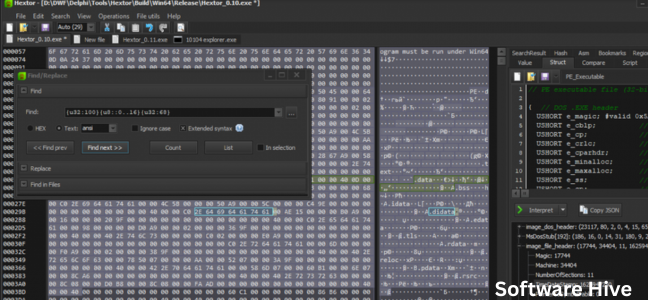
A hex editor (short for hexadecimal editor) is a tool that allows users to view and edit the raw binary data of a file. Instead of seeing text or formatted content, you see the actual bytes that make up the file, displayed in hexadecimal notation (base-16) alongside their ASCII or Unicode representations.
The Hex Editor Delphi5/ActiveX Control is not a standalone application. Instead, it is a software component (specifically, an ActiveX control) that developers can integrate into their own Windows applications. It was originally designed for Borland Delphi 5, but also works with other development environments that support ActiveX, such as Visual C++, Visual Basic, and modern .NET languages.
Key characteristics:
- Component-based – Embedded into your own application, not a separate program
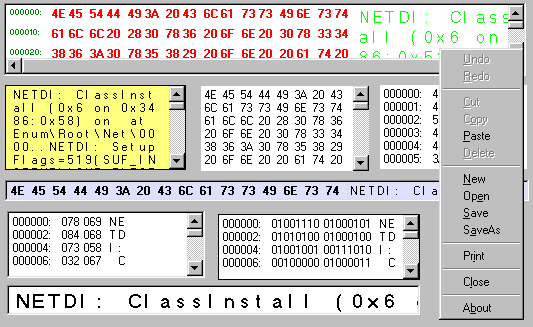
- Multiple radix support – View data in hexadecimal, octal, decimal, or binary formats
- Large file handling – Supports files up to 2 GB
- Undo/Redo functionality – Multilevel undo/redo for safe editing
- ActiveX and Delphi 5 versions – Two versions available for different development needs
Why Developers Need a Hex Editor Component
Common Use Cases for Hex Editing
| Use Case | Description |
|---|---|
| Forensic analysis | Examining file headers, recovering deleted data |
| Reverse engineering | Understanding proprietary file formats |
| Game modding | Editing save files, game resources |
| Malware analysis | Inspecting suspicious executable files |
| Firmware editing | Modifying device firmware images |
| Data recovery | Manually repairing corrupted file structures |
| Educational purposes | Teaching binary data representation |
Why a Component Instead of a Standalone Editor?
| Standalone Hex Editor | Embedded Hex Editor Component |
|---|---|
| Separate application | Integrated into your tool |
| User must switch between programs | Seamless workflow within your app |
| Cannot customize behavior | You control features and UI |
| Requires separate licensing | One component licenses your entire app |
| Standard interface | Can match your application’s look and feel |
For developers building tools that need hex editing capabilities (forensic software, file analyzers, game editors, etc.), embedding a hex editor control is far more professional than asking users to switch to a separate program.
Key Features of the Hex Editor Control
1. Multiple Number Base Views
Data can be displayed in four different radices:
| View | Base | Characters | Use Case |
|---|---|---|---|
| Hexadecimal | 16 | 0-9, A-F | Standard hex editing |
| Octal | 8 | 0-7 | Legacy systems, Unix permissions |
| Decimal | 10 | 0-9 | Human-readable byte values |
| Binary | 2 | 0-1 | Bit-level analysis |
This flexibility is particularly valuable for educational tools and specialized debugging scenarios.
2. Large File Support (Up to 2 GB)
The control can handle files up to 2 gigabytes in size. This was impressive at the time of release (Windows 95/98/XP era) and remains useful today for working with disk images, virtual machine files, and large binary blobs.
Memory usage: The control likely uses a virtual addressing approach, loading only portions of large files into memory rather than the entire file at once.
3. Multilevel Undo/Redo
Editing binary data is error-prone. A single incorrect byte change can corrupt an entire file. The multilevel undo/redo feature allows users to:
- Revert accidental changes (Ctrl+Z)
- Redo changes that were undone (Ctrl+Y)
- Step back through multiple edit operations
This is not just a convenience—it is a safety feature that prevents data loss.
4. Fast Find and Replace
Searching for specific byte sequences in large binary files can be slow. The control includes optimized search algorithms for:
- Finding specific byte patterns (e.g., searching for the bytes
4D 5Ain an executable) - Finding text strings (ASCII and Unicode)
- Replacing found patterns with new data
Common use case: A game modder searching for a specific health value (e.g., 00 64 for 100) and replacing it with a higher value (e.g., 00 C8 for 200).
5. Adjustable Bytes Per Line
Users can configure how many bytes are displayed per row. Common settings:
| Bytes per Line | Typical Use |
|---|---|
| 8 | Quick scanning |
| 16 | Standard hex editor layout |
| 32 | Dense view for large files |
| 64 | Maximizing screen real estate (requires wide monitor) |
Adjustable bytes per line improves readability for different file types and user preferences.
6. Color Coding
Visual distinction makes hex editing more intuitive. The control likely supports color coding for:
- Different byte ranges (ASCII printable vs. non-printable)
- Modified bytes (highlighting unsaved changes)
- Selected ranges
- Search results
7. Dual Version Availability
The developer offers two versions:
| Version | Target Environment |
|---|---|
| Delphi 5 Version | Native VCL component for Borland Delphi 5 |
| ActiveX Control | COM component usable in VB, VC++, .NET, and any ActiveX container |
This dual offering maximizes compatibility across different development ecosystems.
8. Modern OS Compatibility
Despite the “Delphi5” name, the control supports modern Windows versions:
- Windows 95/98/ME (original targets)
- Windows 2000/XP
- Windows 10 (recent testing)
The control likely runs on Windows 11 as well, given Windows’ strong backward compatibility.
Technical Specifications
| Specification | Details |
|---|---|
| Version | 1.1 |
| Platform | Windows |
| Supported OS | Windows 95 through Windows 10 |
| File size limit | 2 GB |
| Development environments | Borland Delphi 5, Visual C++, Visual Basic, any ActiveX container |
| License | Commercial (requires purchase) |
System Requirements
- Windows operating system (95 through 10)
- Development environment that supports ActiveX or Delphi 5
- Minimal RAM (16MB+)
- Disk space for component installation
Limitations
The user reviews are mixed (2.3/5 stars based on 3 reviews). Reported issues include:
- No standalone version (requires programming knowledge)
- Documentation may be limited
- ActiveX is an older technology; modern developers may prefer .NET alternatives
However, one user stated they “love it,” indicating the control works well for its intended use.
How to Use the Hex Editor Control
For Delphi 5 Developers
- Install the Hex Editor control (likely via a
.dpkpackage) - Add the component to the Delphi component palette
- Drag the control onto a form
- Set properties (bytes per line, color scheme, etc.)
- Load a file using the control’s
LoadFromFilemethod - Handle events (on data change, on selection change)
- Save changes using
SaveToFilemethod
For ActiveX Users (VB, VC++, .NET)
- Register the ActiveX control (using
regsvr32or installation program) - Add the control to your toolbox in your development environment
- Place the control on your form
- Access its properties, methods, and events through COM interop
Example Use Cases
Forensic tool:
' Visual Basic 6 pseudo-code
HexControl1.LoadFromFile "C:\evidence\drive.dd"
HexControl1.FindPattern "4D5A" ' Search for MZ executable header
' Analyze and report findings
Game save editor:
// C# .NET using ActiveX
axHexEditor1.LoadFile("savegame.dat");
axHexEditor1.GotoOffset(0x1A4); // Navigate to health value
axHexEditor1.SetByte(0x1A4, 0x64); // Set health to 100
axHexEditor1.SaveChanges();
Educational software:
// Delphi 5
HexEditor1.LoadFromFile('example.exe');
HexEditor1.ViewMode := vmBinary; // Show binary for teaching
HexEditor1.HighlightBytes($4D, $5A); // Show DOS header
Alternatives to Consider
If the Hex Editor Delphi5/ActiveX Control does not meet your needs (or if you prefer a standalone tool), consider these alternatives:
| Tool | Type | Platform | Price | Key Feature |
|---|---|---|---|---|
| HxD | Standalone | Windows | Free | Portable, fast, supports large files |
| 010 Editor | Standalone | Win/Mac/Linux | Paid | Templates, scripting, file comparison |
| Hex Fiend | Standalone | Mac | Free | Open source, handles huge files |
| ImHex | Standalone | Win/Mac/Linux | Free | Modern UI, pattern language |
| Hex Workshop | Standalone | Windows | Paid | Integrated structure viewer |
| This component | Embeddable | Windows | Paid | Integrate into your own app |
When to Use a Component vs. Standalone
Choose the component if:
- You are building a commercial application that needs hex editing
- You want a consistent user experience within your own software
- You need to control which features are exposed
- You are distributing a tool to customers
Choose a standalone tool if:
- You personally need to edit hex files (not distributing to others)
- You prefer an existing, proven interface
- You want free options (HxD, Hex Fiend, ImHex)
- You work across multiple platforms (Mac/Linux)
Frequently Asked Questions (FAQs)
1. Is the Hex Editor Delphi5/ActiveX Control free?
No, this is a commercial product that requires purchase. The CNET Download page provides information and presumably a trial version or purchasing link. For free hex editing, consider HxD or ImHex.
2. Can I use this control with modern Delphi versions (Delphi 10, 11, 12)?
The control is specifically named “Delphi5” and may not work with newer Delphi versions without compatibility adjustments. ActiveX controls generally work across versions, but the native Delphi VCL version is likely tied to Delphi 5. Test before purchasing.
3. What is the difference between the Delphi 5 version and the ActiveX version?
The Delphi 5 version is a native VCL (Visual Component Library) control, designed specifically for Borland Delphi 5. It integrates seamlessly with Delphi’s IDE and uses native Delphi data types.
The ActiveX version is a COM component that can be used in any ActiveX container, including Visual Basic, Visual C++, C#, .NET languages, and even web browsers. It has broader compatibility but may have slightly different properties and methods.
4. Can I use this control in a web application?
ActiveX controls work in Internet Explorer (with specific security settings) but are not supported in modern browsers like Chrome, Firefox, Edge (Chromium), or Safari. For web-based hex editing, you would need a JavaScript/HTML5 solution or a server-side component.
5. What does “supports files up to 2 GB” mean in practice?
The control can open and edit files as large as 2 gigabytes. However, performance depends on your system’s RAM and processing power. Opening a 2 GB file on a system with 512 MB RAM (common when this control was released) would be extremely slow. On modern systems with 16 GB RAM, 2 GB files open reasonably quickly. The control likely uses memory mapping or chunked loading to avoid loading the entire file into memory at once.
6. Why would I need octal or binary views?
- Octal (base-8) is used in Unix file permissions (e.g.,
chmod 755). An octal view helps understand permission bits. - Binary (base-2) is useful for bit-level analysis, such as examining flags, bitfields, or network protocol headers.
Most hex editors only offer hexadecimal view. Having octal and binary options is a distinct advantage of this control.
7. Is ActiveX still relevant in 2026?
ActiveX is an older technology (introduced in 1996). Microsoft has discouraged its use for web development due to security concerns. However, for desktop Windows development, ActiveX controls still work in WinForms, WPF (through interop), and older VB6/Delphi applications. Many industrial, scientific, and enterprise applications continue to use ActiveX components. For new development, consider .NET alternatives or open-source controls.
8. How do I get support for this product?
CNET Download lists the product but does not provide support. Check if the developer (the original author) has a website or contact information. Since the software is older (Delphi 5 era), support may be limited.
9. Does this control work on Windows 11?
The system requirements list Windows 95 through Windows 10. However, Windows 11 shares the same core architecture as Windows 10, so the control should work. ActiveX controls are generally backward compatible. Test the trial version before purchasing.
10. Can I distribute this control with my application?
Yes, that is the purpose of a control/component. You can embed the control in your application and distribute it to your users. However, you must comply with the licensing terms (typically requiring you to purchase a developer license, not a per-user license). Read the End User License Agreement (EULA) carefully.
11. What is the difference between a hex editor and a binary editor?
The terms are often used interchangeably. Strictly speaking:
- A hex editor displays data in hexadecimal (base-16) with an ASCII column.
- A binary editor might display data in binary (base-2) or allow bit-level editing.
This control supports both, plus octal and decimal—so it qualifies as a multi-radix binary editor.
12. Is there a standalone version of this hex editor?
No. This is specifically a component for developers. There is no standalone application called “Hex Editor Delphi5/ActiveX Control” that end users can run. If you need a standalone hex editor, use HxD, 010 Editor, or ImHex instead.
The Legacy of Delphi and ActiveX
The Hex Editor Delphi5/ActiveX Control is a product of its era: the late 1990s to early 2000s, when Borland Delphi was a popular rapid application development (RAD) tool and ActiveX was Microsoft’s standard for reusable components.
Why Delphi? Delphi combined the ease of Visual Basic with the performance of C++. It was widely used for database applications, system utilities, and scientific software.
Why ActiveX? ActiveX allowed components to be written once and used across multiple languages (VB, C++, Delphi, and later .NET). It was the precursor to .NET assemblies.
Today, Delphi has been modernized (now called Embarcadero Delphi) and supports 64-bit compilation and modern Windows versions. ActiveX has largely been replaced by .NET and JavaScript. However, millions of lines of Delphi and ActiveX code remain in production worldwide, particularly in legacy enterprise systems, industrial control software, and government applications.
Conclusion: A Specialized Tool for Specialized Needs
The Hex Editor Delphi5/ActiveX Control is not for everyone. End users who need to edit hexadecimal files should download a free, modern standalone hex editor like HxD or ImHex. That is faster, simpler, and cost-free.
However, if you are a software developer building a tool that requires hex editing capabilities—a forensic analyzer, a game save editor, a proprietary file format viewer, or a firmware updater—this component is exactly what you need. Embedding a pre-built, tested hex editor saves months of development time and provides a professional result.
The support for multiple radices (hex, octal, decimal, binary), large files (up to 2 GB), and multilevel undo/redo makes it a robust solution. The dual Delphi/ActiveX versions ensure compatibility with both legacy and modern development environments.
The user reviews are mixed (2.3/5 stars), but the positive review (“love it”) suggests that for the right developer with the right project, this component is invaluable.
So if you are a Delphi developer maintaining a legacy system, or a Windows developer needing to embed a hex editor in your application, give this control a look. It may be exactly the component you have been searching for.